Screen DefaultsLast Updated August 13, 2002 |
 Related Topics
The screens in TaxLedge have default settings that are based in part on your tax office's Jurisdictional Rules. An example of a screen and its various default settings is given below.
|
|
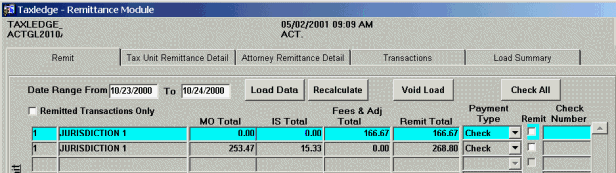
The Remit screen above displays amounts that are ready to remit to each tax unit. In this example, they are separated into three totals: MO, IS, and Fees & Adjustments.
The first record in the list is chosen by default. Use the up and down arrow keys or click the mouse to choose another record.
The chosen record is blue. This is true for every screen in TaxLedge.
Select any of the screen tabs (e.g., Tax Unit Remittance Detail) to bring up a new screen within a module.
Fields where data can be entered are white. This is true for every screen in TaxLedge.
Load Data is an action button. Actions are bolded in the text of this Help system.